This series already covered the basic and integrating multiple developers, but if you can’t deploy it, it’s not a feature, it’s a PoC. Let’s take this final step.
Premises
This is a security feature, so for me there are 2 important distinctions to make for a production environment:
- Different App Registration, so that permissions to Resources like Key Vaults, APIs and storages can be assigned separately
- Different Certificate, avoiding access for developers, limiting signing to our controlled pipeline infrastructure.
This also means 2 measures:
- We need a different App Id in the Managed Identity record in Dynamics. Unfortunately, this property is included in the solution export, so we will need to get around it
- The Plugin Package needs to be signed differently for Production, the signing of the developer won’t work.
I won’t propose a full pipeline here as I expect you to have some sort of ALM already set up if you are using these more advanced features and only include the scripts and parts that we will need to extend it accordingly.
The concept
To get around the different App Registration problem, I will remove the Managed Identity component entirely from my solution. This will create a dependency and importing won’t work until it is fulfilled. This will be done by a script that will Upsert a matching Managed Identity.
For the separate signing I propose the following: We will use a self hosted agent for our building, a simple Azure VM (or something on premise if your IT likes that better), there we run the same certificate generation script we ran for each developer and as it now has the same Common Name (CN), signing will work on build exactly like on the developer machines. We will register that certificate to all environments deployed, so likely all test and production environments.
This is contradicting the MS guidance to not use self-signed certificates for production! But I don’t see the benefit of trusted certificates for this use case and argue that the self-signed one is even more secure as it was never transferred through the network or has touched an admins machine which might have been compromised.
And finally this whole “the package has to be signed by the pipeline host” thing means that we will need to unpack and repack the solution with the replaced plugin package. This ensures that we are actually using the new signature and not the one the developer uploaded to our development environment.
Managed Identity Script
Since removing the Managed Identity from the solution means that there is a dependency required to be fulfilled on the target environment prior to importing the solution, make sure that you run it before the Import step in your pipeline.
[CmdletBinding()]
param(
    [Parameter(Mandatory = $true)]
    [string]$ConnectionString,

    [Parameter(Mandatory = $true)]
    [string]$ApplicationId
)

# These values should match what you have on the development environment.
$managedIdentityId = 'fad536c1-f84e-f111-bec6-000d3ade2e65'
$tenantId = '738016bf-2f59-46ca-9660-357d1de3b865'
$name = 'ManagedIdentitySample'


$module = 'Microsoft.Xrm.Data.PowerShell'
Write-Host "Checking PowerShell module '$module'..."
if (-not (Get-Module -ListAvailable -Name $module)) {
    Write-Host "Installing PowerShell module '$module'..."
    Install-Module -Name $module -Scope CurrentUser -Force -AllowClobber
}
Import-Module $module

Write-Host "Connecting to Dataverse..."
$client = Get-CrmConnection -ConnectionString $ConnectionString
if (-not $client.IsReady) {
    throw "Failed to connect to Dataverse: $($client.LastError)"
}
Write-Host "Connected to $($client.ConnectedOrgFriendlyName)."

$entity = New-Object Microsoft.Xrm.Sdk.Entity('managedidentity')
$entity.Id = [System.Guid]::Parse($managedIdentityId)
$entity.Attributes.Add('managedidentityid', [System.Guid]::Parse($managedIdentityId))
$entity.Attributes.Add('name', $name)
$entity.Attributes.Add('applicationid', [System.Guid]::Parse($ApplicationId.Trim('{', '}')))
$entity.Attributes.Add('tenantid', [System.Guid]::Parse($tenantId))
$entity.Attributes.Add('credentialsource', (New-Object Microsoft.Xrm.Sdk.OptionSetValue(2)))
$entity.Attributes.Add('subjectscope', (New-Object Microsoft.Xrm.Sdk.OptionSetValue(1)))

$upsert = New-Object Microsoft.Xrm.Sdk.Messages.UpsertRequest
$upsert.Target = $entity

Write-Host "Upserting managed identity '$name' ($managedIdentityId)..."
$response = $client.Execute($upsert)

if ($response.RecordCreated) {
    Write-Host "Managed identity created: $($response.Target.Id)"
}
else {
    Write-Host "Managed identity updated: $($response.Target.Id)"
}
It is important that we set the Id of the managedidentity itself when creating the record as this is required for the match with the dependency of the solution. Output of the script might look a little something like this:
PS C:\Repos\Kunter-Bunt\...\ManagedIdentitySample> .\cicd\scripts\CreateManagedIdentity.ps1
    -ConnectionString "AuthType=OAuth;Url=https://mariuswodtke-mvp.crm4.dynamics.com/;Username=mariuswodtke@mariuswodtkemvp.onmicrosoft.com;ClientId={51f81489-12ee-4a9e-aaae-a2591f45987d};LoginPrompt=Auto;RedirectUri=app://58145b91-0c36-4500-8554-080854f2ac97/;TokenCacheStorePath="
    -ApplicationId "cb0ad09c-1857-4d5d-a580-d4a6b533a562"
Checking PowerShell module 'Microsoft.Xrm.Data.PowerShell'...
Connecting to Dataverse...
Connected to MVP Stuff.
Upserting managed identity 'ManagedIdentitySample' (fad536c1-f84e-f111-bec6-000d3ade2e65)...
Managed identity updated: fad536c1-f84e-f111-bec6-000d3ade2e65
Pro Tip: For build machines I like to use ClientId and (Certificate) Thumbprint for Connection Strings. That way I don’t have to manage any secrets in DevOps, the Certificate is already on the Machine. However, this is a different ClientId and Certificate than the ones for signing our plugin package and that would have blasted the scope of this article.
I like to store the script as a file and then call it like this
steps:
  - task: PowerShell@2
    displayName: 'Upsert ManagedIdentity in Dataverse'
    inputs:
      targetType: 'filePath'
      filePath: '$(Build.SourcesDirectory)/cicd/scripts/CreateManagedIdentity.ps1'
      arguments: '-ConnectionString "$env:DATAVERSE_CONNECTION_STRING" -ApplicationId "$env:APPLICATION_ID"'
      pwsh: true
      failOnStderr: true
    env:
      DATAVERSE_CONNECTION_STRING: $(DataverseConnectionString)
      APPLICATION_ID: $(ApplicationId)
this is packed as a template as I of course need a different DataverseConnectionString and ApplicationId for Test and Prod. Those are called from my pipeline entrypoint (or for you such a stage may also already be a template as they become more complex)
stages:
  - stage: Test
    displayName: 'Deploy to Test'
    variables:
      - group: ManagedIdentity-Test
    jobs:
      - deployment: DeployTest
        displayName: 'Upsert managed identity (Test)'
        environment: 'Dataverse-Test'
        strategy:
          runOnce:
            deploy:
              steps:
                - checkout: self
                - template: cicd/templates/deploy-managed-identity.yml

  - stage: Prod
    displayName: 'Deploy to Prod'
    dependsOn: Test
    condition: succeeded()
    variables:
      - group: ManagedIdentity-Prod
    jobs:
      - deployment: DeployProd
        displayName: 'Upsert managed identity (Prod)'
        environment: 'Dataverse-Prod'
        strategy:
          runOnce:
            deploy:
              steps:
                - checkout: self
                - template: templates/deploy-managed-identity.yml
Notice that the environment and variables->group parameters are different for Test and Production to achieve the different AppId.
Variable Groups are found in DevOps under Pipelines->Library.
Repackaging the Solution
To replace a file when creating a solution zip, you can pass an additional mapping file to the solution packager. My unpacked solution is part of the repository in the folder solution.
<?xml version="1.0" encoding="utf-8"?>
<Mapping>
  <FileToFile
    map="mwo_ManagedIdentitySample.nupkg"
    to="artifacts\pack\mwo_ManagedIdentitySample.nupkg" />
</Mapping>
Now my build phase (pick your bits again, you might also want to run test etc.).
Important: Your admin running the script to register the certificate will not be on the same windows account that is running the pipeline! Therefore, to let the pipeline read the cert, find it in the Windows Certificates Tool -> All Tasks -> Manage Private Keys -> Find User NETWORK SERVICE -> Read.
variables:
  # Your CN here, make sure it is installed on the machine and available to NETWORK SERVICE.
  CertificateSubjectName: 'MariusWodtkeMVP'

stages:
  - stage: Build
    displayName: 'Build, sign & package solution'
    jobs:
      - job: BuildJob
        displayName: 'Build plugin, sign nuget, repack solution'
        steps:
          - checkout: self

          - task: UseDotNet@2
            displayName: 'Install .NET SDK'
            inputs:
              packageType: 'sdk'
              version: '8.x'

          - task: NuGetToolInstaller@1
            displayName: 'Install NuGet'

          - script: dotnet tool install --global Microsoft.PowerApps.CLI.Tool
            displayName: 'Install Power Platform CLI (pac)'

          - task: DotNetCoreCLI@2
            displayName: 'Restore'
            inputs:
              command: 'restore'
              projects: 'ManagedIdentitySample.csproj'

          - task: DotNetCoreCLI@2
            displayName: 'Build (Release)'
            inputs:
              command: 'build'
              projects: 'ManagedIdentitySample.csproj'
              arguments: '--configuration Release --no-restore'

          # Package NuGet and move to pack folder with deterministic name
          - pwsh: |
              New-Item -ItemType Directory -Force -Path 'artifacts/nupkg' | Out-Null
              New-Item -ItemType Directory -Force -Path 'artifacts/pack'  | Out-Null
              dotnet pack 'ManagedIdentitySample.csproj' --configuration Release --no-build --output 'artifacts/nupkg'
              $built = Get-ChildItem 'artifacts/nupkg/*.nupkg' | Select-Object -First 1
              Copy-Item $built.FullName 'artifacts/pack/mwo_ManagedIdentitySample.nupkg' -Force
            displayName: 'Pack nuget'

          # Sign package
          - pwsh: |
              nuget sign 'artifacts/pack/mwo_ManagedIdentitySample.nupkg' `
                -CertificateStoreLocation CurrentUser `
                -CertificateStoreName My `
                -CertificateSubjectName '$(CertificateSubjectName)' `
                -Timestamper 'http://timestamp.digicert.com' `
                -Overwrite
            displayName: 'Sign nuget package'

          # Repack the solution, using the mapping file
          - pwsh: |
              New-Item -ItemType Directory -Force -Path '$(Build.ArtifactStagingDirectory)' | Out-Null
              pac solution pack `
                --zipfile '$(Build.ArtifactStagingDirectory)/ManagedIdentitySample.zip' `
                --folder 'solution' `
                --packagetype Unmanaged `
                --map 'solution-map.xml'
            displayName: 'Pack solution with freshly built nuget'

          # Publish solution for the other stages
          - task: PublishPipelineArtifact@1
            displayName: 'Publish packaged solution'
            inputs:
              targetPath: '$(Build.ArtifactStagingDirectory)/ManagedIdentitySample.zip'
              artifact: 'solution'
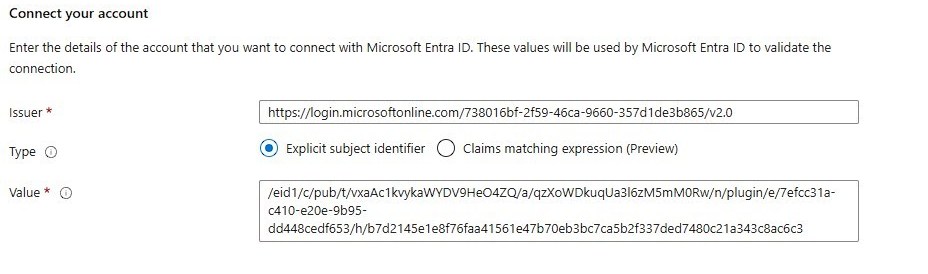
Note: When you create the certificate using the script on the machine, you will only register it to one App Registration in Azure. If (and we should) use different App Registrations for Test and Prod, this means we will have to also register the Federated Credential to the other App Registration!
Summary
Hurray, we now have a zip file with a signed plugin package that is using a different certificate than our developers. We also have a script to ensure that the managed identity record on each environment point to the correct App Registration prior to deployment. And last thing for our pipeline to do is import and publish and you have a secure solution for interacting with external systems in your production environment.