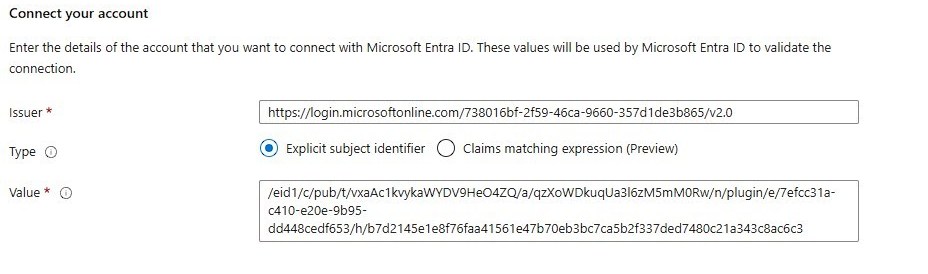
With the recent article on the usage of the Managed Identity feature for plugin packages, in theory we have everything to start developing. But especially in team, everyone needs to learn the process and we want to make it a bit easier for everyone that needs to release often.
In this article we are going to tackle two improvements: For once we will register the the federated credential automatically, making it easier to onboard other developers. And we are going to sign the package on building automatically, improving the deployment cycle.
Registering Federated Credentials
I’ve put on the entire code, if you already followed the last article, only the highlighted parts are new to you:
- Log in to azure
- Find AppRegistration by name (new variable in line 3)
- If it does not exist, create it
- Find a federated credential by email as name
- If it does not exist, create it
- If it exists, update the subject
There are of course some prerequisites with doing things in Azure. To automate this, you need to:
- Be able to list AppRegistrations
- Be able to create AppRegistration (if you are the first one)
- Be able to list Federated Credentials for the given AppRegistration
- Be able to create a Federated Credential for the given AppRegistration
Of course you would need these for the manual process as well, but in an Enterprise setting this might be delegated to an Administrator, depending on their strictness.
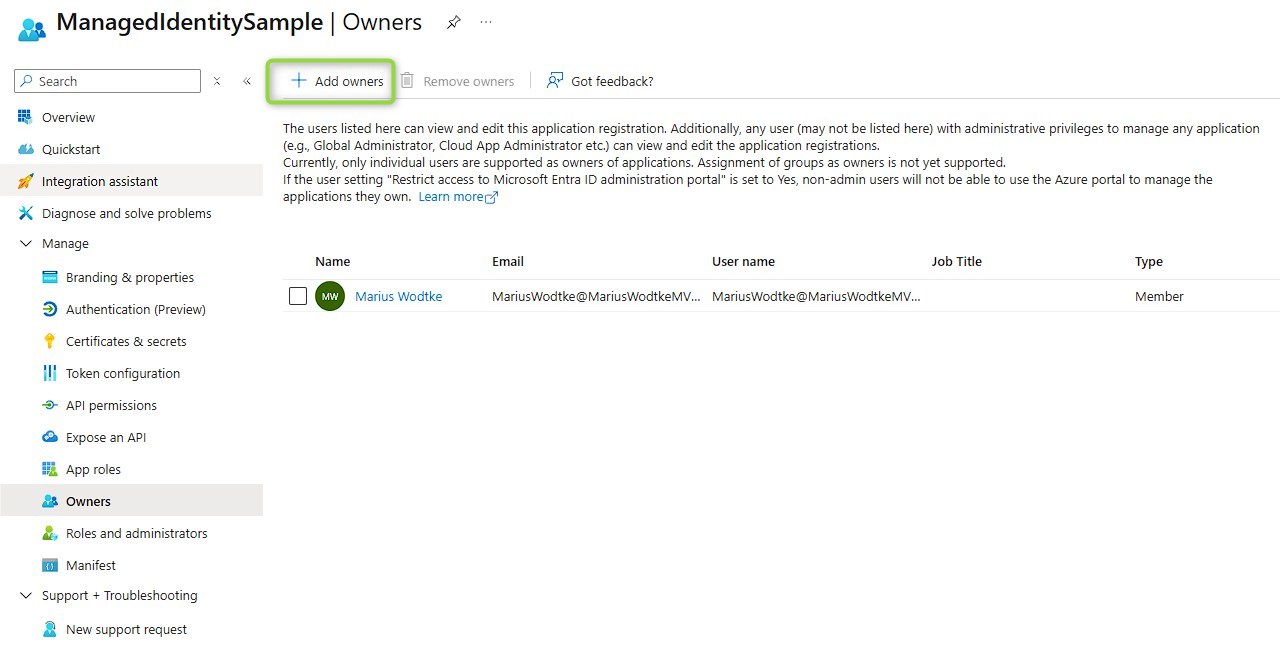
But for everyone besides the one creating the AppRegistration, the access to the Federated Credentials is critical. Since your team mates won’t be Global Admins or similar, they need to be added as Owners of the AppRegistrations!
$email = 'MariusWodtke@MariusWodtkeMVP.onmicrosoft.com'
$commonName = 'MariusWodtkeMVP'
$AppRegistrationName = 'ManagedIdentitySample'
$tenantId = '738016bf-2f59-46ca-9660-357d1de3b865'
$environmentId = '7efcc31a-c410-e20e-9b95-dd448cedf653'

$params = @{
    Type = 'Custom'
    Subject = "E=$email,CN=$commonName"
    TextExtension = @(
        '2.5.29.37={text}1.3.6.1.5.5.7.3.3',
        "2.5.29.17={text}email=$email" )
    KeyAlgorithm = 'RSA'
    KeyLength = 2048
    SmimeCapabilities = $true
    CertStoreLocation = 'Cert:\CurrentUser\My'
}
$cert = New-SelfSignedCertificate @params
Write-Host "New Certificate generated"

$store = New-Object System.Security.Cryptography.X509Certificates.X509Store("Root", "CurrentUser")
$store.Open("ReadWrite")
$store.Add($cert)
$store.Close()
Write-Host "Certificate installed to Trusted Root store"

$cerFilePath = "$PSScriptRoot\$commonName.cer"
Export-Certificate -Cert $cert -FilePath $cerFilePath
Write-Host "Certificate exported to: $cerFilePath"

$certUtilOutput = CertUtil -hashfile $cerFilePath SHA256
$hash = ($certUtilOutput | Select-Object -Index 1).Trim()
Write-Host "`nSHA256 Hash: $hash"

$tenantGuid = [System.Guid]::Parse($tenantId)
$tenantHex = $tenantGuid.ToByteArray()
$tenantBase64 = [System.Convert]::ToBase64String($tenantHex)
$encodedTenantId = $tenantBase64.Replace('+', '-').Replace('/', '_').TrimEnd('=')
Write-Host "`nEncoded Tenant ID: $encodedTenantId"

$subject = "/eid1/c/pub/t/$encodedTenantId/a/qzXoWDkuqUa3l6zM5mM0Rw/n/plugin/e/$environmentId/h/$hash"
Write-Host "`nComplete Subject:"
Write-Host $subject

$register = Read-Host "`nDo you want to register this as a federated credential in Azure? (y/n)"
if ($register -eq 'y' -or $register -eq 'Y') {
    $issuer = "https://login.microsoftonline.com/$tenantId/v2.0"

    Write-Host "`nLogging in to Azure (tenant: $tenantId)..."
    az login --tenant $tenantId
    Write-Host "Logged in successfully."

    Write-Host "`nLooking for app registration '$AppRegistrationName'..."
    $app = az ad app list --display-name $AppRegistrationName --query "[0]" -o json | ConvertFrom-Json

    if ($null -eq $app) {
        Write-Host "App registration not found. Creating '$AppRegistrationName'..."
        $app = az ad app create --display-name $AppRegistrationName -o json | ConvertFrom-Json
        Write-Host "App registration created with AppId: $($app.appId)"
    }
    else {
        Write-Host "Found existing app registration with AppId: $($app.appId)"
    }

    $credentialParams = @{
        name      = $email
        issuer    = $issuer
        subject   = $subject
        audiences = @("api://AzureADTokenExchange")
    } | ConvertTo-Json

    Write-Host "`nLooking for existing federated credential with name '$email'..."
    $existingCred = az ad app federated-credential list --id $app.appId --query "[?name=='$email'] | [0]" -o json | ConvertFrom-Json

    if ($null -eq $existingCred) {
        Write-Host "No existing credential found. Creating federated credential..."
        $credentialParams | az ad app federated-credential create --id $app.appId --parameters '@-'
        Write-Host "Federated credential created successfully."
    }
    else {
        Write-Host "Existing credential found (id: $($existingCred.id)). Updating subject..."
        $updateParams = @{
            subject = $subject
        } | ConvertTo-Json
        $updateParams | az ad app federated-credential update --id $app.appId --federated-credential-id $existingCred.id --parameters '@-'
        Write-Host "Federated credential updated successfully."
    }
}
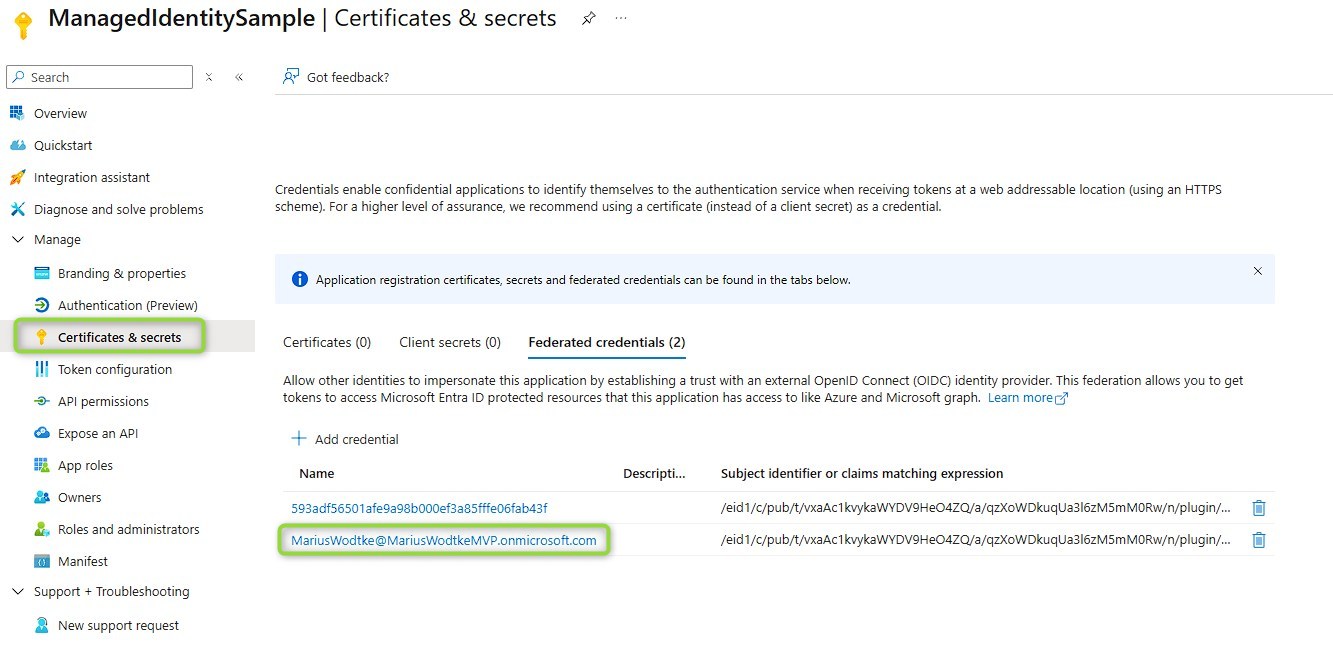
For completeness, here is a sample log. Of course my AppRegistration already exists, but the credential had the wrong naming.
// prior output, see prior article ...
Complete Subject:
/eid1/c/pub/t/vxaAc1kvykaWYDV9HeO4ZQ/a/qzXoWDkuqUa3l6zM5mM0Rw/n/plugin/e/7efcc31a-c410-e20e-9b95-dd448cedf653/h/4c08fc818f2ac94ea40d332820f7523b504ea62efcb970d5381243e27a2e8c0d

Do you want to register this as a federated credential in Azure? (y/n): y

Logging in to Azure (tenant: 738016bf-2f59-46ca-9660-357d1de3b865)...
A web browser has been opened at https://login.microsoftonline.com/738016bf-2f59-46ca-9660-357d1de3b865/oauth2/v2.0/authorize. Please continue the login in the web browser. If no web browser is available or if the web browser fails to open, use device code flow with `az login --use-device-code`.
[
  {
    "cloudName": "AzureCloud",
    "homeTenantId": "738016bf-2f59-46ca-9660-357d1de3b865",
    "id": "ef6157fc-0c07-40ce-b0a4-dbdbc04a7572",
    "isDefault": true,
    "managedByTenants": [],
    "name": "Azure subscription 1",
    "state": "Enabled",
    "tenantId": "738016bf-2f59-46ca-9660-357d1de3b865",
    "user": {
      "name": "MariusWodtke@MariusWodtkeMVP.onmicrosoft.com",
      "type": "user"
    }
  }
]
Logged in successfully.

Looking for app registration 'ManagedIdentitySample'...
Found existing app registration with AppId: cb0ad09c-1857-4d5d-a580-d4a6b533a562

Looking for existing federated credential with name 'MariusWodtke@MariusWodtkeMVP.onmicrosoft.com'...

Creating federated credential...
{
  "@odata.context": "https://graph.microsoft.com/v1.0/$metadata#applications('5261938b-f9ac-44d0-bcb2-84d8e147d61a')/federatedIdentityCredentials/$entity",
  "audiences": [
    "api://AzureADTokenExchange"
  ],
  "description": null,
  "id": "8c70a73b-75f4-47e1-9349-e72594b98499",
  "issuer": "https://login.microsoftonline.com/738016bf-2f59-46ca-9660-357d1de3b865/v2.0",
  "name": "MariusWodtke@MariusWodtkeMVP.onmicrosoft.com",
  "subject": "/eid1/c/pub/t/vxaAc1kvykaWYDV9HeO4ZQ/a/qzXoWDkuqUa3l6zM5mM0Rw/n/plugin/e/7efcc31a-c410-e20e-9b95-dd448cedf653/h/4c08fc818f2ac94ea40d332820f7523b504ea62efcb970d5381243e27a2e8c0d"
}
Federated credential created successfully.
If you need additional inspiration, you may also like [this article by Raphael Pothin]If you need additional inspiration, you may also like this article by Raphael Pothin, he is working with the designated managed identity object in Azure.
Signing the Package
Next up are some build automations. Got inspired here by Daryl LaBar, but of course we need to adapt this to sign our package first and I let GitHub Copilot code it to the csproj file directly for my convenience here ;)
The added lines are highlighted again, you will need to adapt the properties
- DeploymentPacAuthName: How you named your connection in the PAC CLI
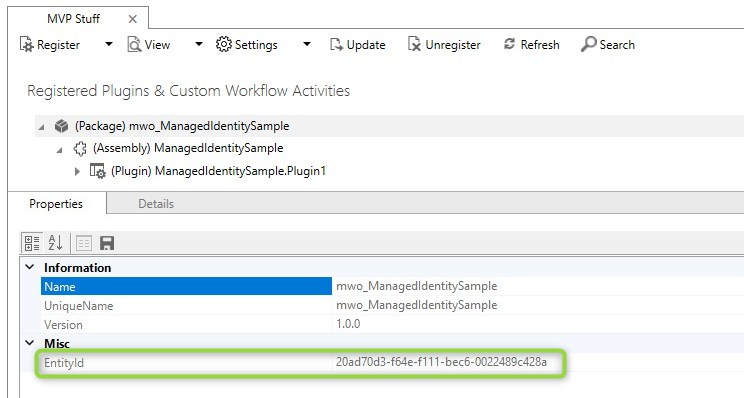
- PluginPackageId: This can be retrieved from the PRT, see image below
- CertificateSubjectName: Take this from your certificate script
<Project Sdk="Microsoft.NET.Sdk">
<PropertyGroup>
<TargetFramework>net462</TargetFramework>
<PowerAppsTargetsPath>$(MSBuildExtensionsPath)\Microsoft\VisualStudio\v$(VisualStudioVersion)\PowerApps</PowerAppsTargetsPath>
<SignAssembly>true</SignAssembly>
<AssemblyOriginatorKeyFile>ManagedIdentitySample.snk</AssemblyOriginatorKeyFile>
<PluginVersion>1.0.6</PluginVersion>
<AssemblyVersion>$(PluginVersion).0</AssemblyVersion>
<FileVersion>$(PluginVersion).0</FileVersion>
<ProjectTypeGuids>{4C25E9B5-9FA6-436c-8E19-B395D2A65FAF};{FAE04EC0-301F-11D3-BF4B-00C04F79EFBC}</ProjectTypeGuids>
<Configurations>Debug;Release;DevDeploy</Configurations><!-- This is added automatically upon creating the DevDeploy configuration -->
</PropertyGroup>
<Import Project="$(PowerAppsTargetsPath)\Microsoft.PowerApps.VisualStudio.Plugin.props" Condition="Exists('$(PowerAppsTargetsPath)\Microsoft.PowerApps.VisualStudio.Plugin.props')" />
<!--
NuGet pack and restore as MSBuild targets reference:
https://docs.microsoft.com/en-us/nuget/reference/msbuild-targets
-->
<PropertyGroup>
<PackageId>ManagedIdentitySample</PackageId>
<Version>$(PluginVersion)</Version>
<Authors>mariu</Authors>
<Company>MyCompany</Company>
<Description>This is a sample nuget package which contains a Dataverse plugin and its runtime dependencies like Newtonsoft.Json</Description>
</PropertyGroup>
<ItemGroup>
<PackageReference Include="Microsoft.CrmSdk.CoreAssemblies" Version="9.0.2.*" PrivateAssets="All" />
<PackageReference Include="Microsoft.PowerApps.MSBuild.Plugin" Version="1.*" PrivateAssets="All" />
<PackageReference Include="Microsoft.NETFramework.ReferenceAssemblies" Version="1.0.*" PrivateAssets="All" />
</ItemGroup>
<Import Project="$(PowerAppsTargetsPath)\Microsoft.PowerApps.VisualStudio.Plugin.targets" Condition="Exists('$(PowerAppsTargetsPath)\Microsoft.PowerApps.VisualStudio.Plugin.targets')" />
<!-- Plugin Package Deployment Settings -->
<PropertyGroup>
<GeneratePackageOnBuild>false</GeneratePackageOnBuild>
<DeploymentConfigurationName>Release</DeploymentConfigurationName>
<DeploymentOutDir>bin\$(DeploymentConfigurationName)\</DeploymentOutDir>
<DeploymentPacAuthName>MVP</DeploymentPacAuthName>
<PluginPackageId>20ad70d3-f64e-f111-bec6-0022489c428a</PluginPackageId>
<CertificateSubjectName>MariusWodtkeMVP</CertificateSubjectName>
</PropertyGroup>
<!-- Updates version in memory so the plugin DLL is built with the new version number -->
<Target Name="IncrementVersion" BeforeTargets="PrepareForBuild" Condition="'$(Configuration)' == 'DevDeploy'">
<PropertyGroup>
<_Major>$(PluginVersion.Split('.')[0])</_Major>
<_Minor>$(PluginVersion.Split('.')[1])</_Minor>
<_Patch>$(PluginVersion.Split('.')[2])</_Patch>
<_NewPatch>$([MSBuild]::Add($([System.Int32]::Parse($(_Patch))), 1))</_NewPatch>
<_NewVersion>$(_Major).$(_Minor).$(_NewPatch)</_NewVersion>
<PluginVersion>1.0.6</PluginVersion>
<Version>$(_NewVersion)</Version>
<AssemblyVersion>$(_NewVersion).0</AssemblyVersion>
<FileVersion>$(_NewVersion).0</FileVersion>
</PropertyGroup>
<Message Text="Setting Plugin Version to: $(_NewVersion)" Importance="high" />
</Target>
<!-- Runs after DevDeploy build: persists new version to disk, packs, signs, then pushes to Dataverse -->
<Target Name="DevDeployPostBuild" AfterTargets="Build" Condition="'$(Configuration)' == 'DevDeploy'">
<Message Text="Updating csproj PluginVersion to $(Version)" Importance="high" />
<Exec Command="powershell -Command "(Get-Content '$(MSBuildProjectFullPath)') -replace '<PluginVersion>[^<]*</PluginVersion>', '<PluginVersion>$(Version)</PluginVersion>' | Set-Content '$(MSBuildProjectFullPath)'"" />
<Message Text="Deleting old nupkg files" Importance="high" />
<Exec Command="del "$(MSBuildProjectDirectory)\$(DeploymentOutDir)*.nupkg" /q" IgnoreExitCode="true" />
<Message Text="Running dotnet pack for version $(Version)" Importance="high" />
<Exec Command="dotnet pack "$(MSBuildProjectFullPath)" --configuration $(DeploymentConfigurationName) --output "$(MSBuildProjectDirectory)\$(DeploymentOutDir)"" />
<Message Text="Signing $(PackageId).$(Version).nupkg" Importance="high" />
<Exec Command="nuget sign "$(MSBuildProjectDirectory)\$(DeploymentOutDir)$(PackageId).$(Version).nupkg" -CertificateStoreLocation CurrentUser -CertificateStoreName My -CertificateSubjectName $(CertificateSubjectName) -Overwrite" />
<Message Text="Selecting PAC auth: $(DeploymentPacAuthName)" Importance="high" />
<Exec Command="PAC auth select -n "$(DeploymentPacAuthName)"" />
<Message Text="Pushing plugin package $(PluginPackageId)" Importance="high" />
<Exec Command="PAC plugin push -id $(PluginPackageId) -pf "$(MSBuildProjectDirectory)\$(DeploymentOutDir)$(PackageId).$(Version).nupkg"" />
</Target>
</Project>
Now this wont trigger yet, because Daryl already thought about that we don’t want to deploy every Unit Test run we do. Instead, this only works if we are building with a Configuration “DevDeploy”, to create it, open the selector for the configuration at the top and click “Configuration Manager …” or right click the Solution and hit “Configuration Manager …” in the context menu and create “DevDeploy” as shown below.
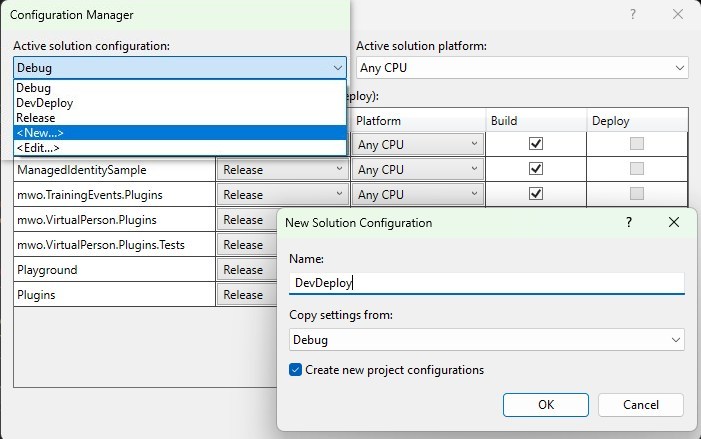
And now just hit “Build” or “Rebuild” and it will deploy a signed Assembly directly to Dataverse!
Summary
With these two improvements serious development with signed plugin packages should get much easier.
The script got extended to automatically register a new (or updated) federated credential in Azure, making onboarding effortless. Just make sure your colleague is added a co-owner of the AppRegistration and then tell them to run the script and they will be good to go.
Once the new DevDeploy configuration is set up a build in this configuration will automatically increment the package version, sign it and push it to your dev environment, also in a pretty effortless manner. I think that at least the incrementing and signing part is vital to larger or changing teams as the manual process will quickly become cumbersome to explain and execute. This by the way does not mean that you can bin the Plugin Registration Tool (PRT), you’ll still need it for the initial setup and for registering steps and images.
What we are still missing is the move to test/production because remember: “A feature that you can’t deploy isn’t a feature.”
So stay tuned for the next one!